
 2027 New Seller Registration Now Open Click to Learn More2027 New Seller Registration Now Open Click to Learn More


High return rate?Amazon's “spare parts reissue” function is online. Registration is free to avoid 71% returns!
February 27, 2026
Table of Contents
1/ What is the “Spare Parts Reissue” program?
2/ Consumer experience with the “Spare Parts Reissue” Program
3/ How do I sign up for the “Spare Parts Reissue” program?
4/ How to create component ASINs/SKUs?
5/ IMPORTANT UPDATE: Partial Refund Performance Report Online
Seller FAQ
1/ What is the “Spare Parts Reissue” program?
2/ Consumer experience with the “Spare Parts Reissue” Program
3/ How do I sign up for the “Spare Parts Reissue” program?
4/ How to create component ASINs/SKUs?
5/ IMPORTANT UPDATE: Partial Refund Performance Report Online
Seller FAQ
Customer: I spent two hours assembling the shoe rack and found that 2 poles were missing. I didn't want to order a new one because then I would have to spend another two hours reassembling it.
Seller: We want to provide consumers with more flexible after-sales solutions, such as reissuing parts to avoid returning the entire product.
Seller: We want to provide consumers with more flexible after-sales solutions, such as reissuing parts to avoid returning the entire product.
In order to optimize the after-sales experience for consumers and sellers, Amazon has launched a “spare parts replacement” program. Sellers can register for free, allowing Amazon customers to directly request missing or damaged parts from the seller within the return window for free without having to return the entire item.
According to the data 1, approximately 71% of customers choose to keep the product rather than return it after receiving replacement parts when needed!
Applicable sites
◉ American station
◉ Canada Station
◉ Europe Station (UK/Germany/France/Italy/Spain/Netherlands/Belgium/Sweden/Poland)
Seller requirements
◉ Delivery method — The parent ASIN/SKU must be Fulfilled by Amazon (FBA), and seller-shipped (FBM) ASINs are not eligible for registration.
◉ Delivery method — Spare parts ASIN/SKU, parts orders can be completed through Amazon Logistics (FBA) or Seller Self Delivery (FBM).
*Data Source: Amazon Research

After the seller joins the “Spare Parts Reissue” program, the system intelligently displays this option at four key points in the consumer journey, supports triggering at any time, and effectively intercepts returns.
Entrance 1 Email and App Reminder (US station only)
In the product delivery email and app reminder, users are directed to the “Product Support” page, which includes the “Spare Parts Reissue” option.
At this point, the customer has just received the product -> inform the after-sales options in advance

Entry 2 Order Page
On the order page, select the corresponding product, and you can go directly to the product support page to check the seller's registered solution.
At this point, customers may have minor questions -> take the initiative with a solution
On the order page, select the corresponding product, and you can go directly to the product support page to check the seller's registered solution.
At this point, customers may have minor questions -> take the initiative with a solution
Entry 3 Return process
After clicking “Return or Exchange Product”, check the reason for the return, and the product support page will automatically pop up.
At this point, the customer has expressed a desire to return the item -> We provide medical support for the symptoms
After clicking “Return or Exchange Product”, check the reason for the return, and the product support page will automatically pop up.
At this point, the customer has expressed a desire to return the item -> We provide medical support for the symptoms

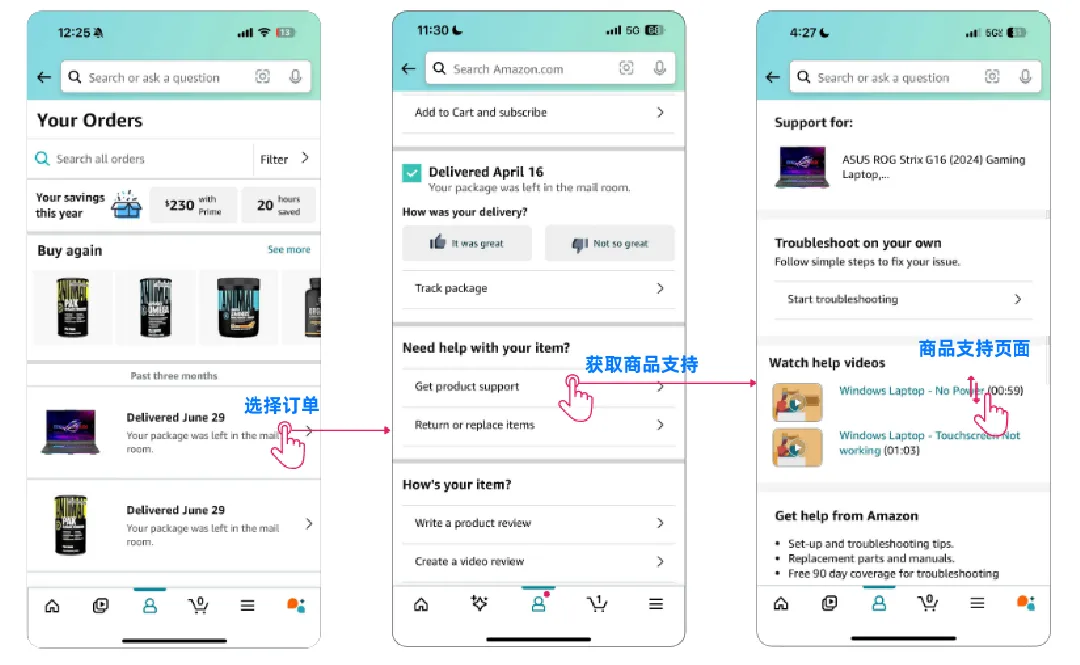
Entrance 4 Customer Service Center
The customer selects the problematic order and selects “Get Product Support” to enter the product support page.
At this point, the customer has a problem seeking help from customer service -> Product support comes to the market
The customer selects the problematic order and selects “Get Product Support” to enter the product support page.
At this point, the customer has a problem seeking help from customer service -> Product support comes to the market

The four major entrances run through all aspects of after-sales service, effectively improving consumers' access to and use of “product support” and “spare parts replacement” programs.


1. Create an FBA or FBM ASIN/SKU for the part in Seller Central and do not upload inventory once created.
2. Log in to the “Amazon Product Support Registration Portal” in Seller Central, select “Provide Replacements Parts (Provide Replacements Parts)” and complete the registration form.
Copy the link to your browser to open the Amazon Product Support Registration Portal:
https://sellercentral.amazon.com/productsupport

3. After receiving a confirmation email from the Product Support Team (estimated 15 business days), upload the parts inventory on the Inventory Management page in Seller Central at this point.

⚠️ Note: If you submit an incorrect form, you will receive an email with instructions on how to correct the information. Please respond within 5 working days, otherwise your application will be closed and you will need to re-submit the application form.
Seller withdraws from the program
If you need to opt out/suspend this function later: Apply by email 15 working days in advance
◉ European site: plsreplacementparts-onboarding-eu@amazon.com
◉ US site, Canada site: plsreplacementparts-onboarding-na@amazon.com
Seller withdraws from the program
If you need to opt out/suspend this function later: Apply by email 15 working days in advance
◉ European site: plsreplacementparts-onboarding-eu@amazon.com
◉ US site, Canada site: plsreplacementparts-onboarding-na@amazon.com

Step1
On the Add Product page, select “Blank Form” and click “Go”.
On the Add Product page, select “Blank Form” and click “Go”.

Step2
You will go to the “Add Product” page, enter the name of the component you want to add, and select the appropriate product category.
You will go to the “Add Product” page, enter the name of the component you want to add, and select the appropriate product category.

Step3
1. Enter your brand name and spare part-related information. In the “External Product ID” line, select “UPC” in the drop-down menu on the right.
1. Enter your brand name and spare part-related information. In the “External Product ID” line, select “UPC” in the drop-down menu on the right.

2. Fill in the description of the spare part.

3. Fill in spare parts product details

4. Fill in the offer information.

⚠️ Please note: Your price and the list price without tax should be the original price of the product. You should not mark a price as zero to offer a product for free. Once the listing is created and the registration form is submitted, the Amazon team will whitelist this part ASIN/SKU, so you can only offer this product to customers for free once they have purchased the parent ASIN/SKU.
Step4
Once you have created an ASIN for the spare parts you want to join the spare parts reissue program, fill out the matching template (download in the registration form) and upload it to the registration form, indicating which spare parts (child ASINs) should match to which original products (parent ASINs).
Once you have created an ASIN for the spare parts you want to join the spare parts reissue program, fill out the matching template (download in the registration form) and upload it to the registration form, indicating which spare parts (child ASINs) should match to which original products (parent ASINs).

Finally, after you submit the matching template, the Amazon team will hide your spare parts offers. After completing this step, please do not upload inventory; wait until the Amazon team has confirmed your registration is complete before uploading your parts inventory.
⚠️ Important note: If you upload inventory after receiving the confirmation email, your spare parts will be displayed on the Amazon website, and customers will be able to place orders for free.
⚠️ Important note: If you upload inventory after receiving the confirmation email, your spare parts will be displayed on the Amazon website, and customers will be able to place orders for free.

In response to the “partial refund” feature that sellers are concerned about, starting in 2026, Amazon will send monthly performance reports to sellers in the form of emails to help sellers understand return data for products registered for partial refunds.
The report contains three worksheets:
1. Partial Refund Order Details: View specific order information, including order ID, ASIN, refund date, partial refund percentage, and amount issued to the customer.
2. Partial Refund ASIN Insights: Track monthly ASIN-level performance metrics, including partial refund units, customer adoption rate, and average refund percentage.
3. Metric Definitions: Find a comprehensive explanation of all metrics used in the report.
⚠️ Note:
① The email is from the Amazon Returns team titled “FBA Partial Refunds Performance Report.”
② Please download the report via the link in the email within 5 business days of receiving the email, otherwise the report will expire.

Once a “partial refund” is enabled, sellers can refund part of the money to the buyer while allowing them to keep the item. This saves costs associated with high return rates, customer returns processing, storage, and removal.

1. Will any customers abuse the “Spare Parts Reissue Program”?
Amazon has protections in place to automatically rule out suspicious customer behavior. Additionally, sellers can control which accessories are included in this program.
2. Which ASINs can sign up for this program?
Any ASIN shipped by FBA can sign up for the Spare Parts Reissue Program. This program works best when ASINs are sometimes returned by customers due to missing parts, damaged parts, defective parts, or incompatible parts.
3. What are the costs of joining the spare parts replacement program?
Signing up for the program is free, and although sellers must bear the cost of spare parts (free to customers) and shipping costs (FBA fees or self-delivery fees), sellers can save on two-way return shipping, repackaging, and handling costs, and avoid full refunds (which are all higher than parts and shipping costs).
4. Wouldn't this feature be complicated to manage?
Once registration is complete, the seller's main management job is only to confirm the customer's spare parts order (which can be confirmed manually or automatically) and monitor/add spare parts inventory on a regular basis.
5. Does the seller have to create a new listing for the replacement part ASIN/SKU?
If you have sold this part to customers through regular listings, Amazon does not require the creation of a new replacement part ASIN/SKU.
6. Can sellers also provide replacement parts ASINs/SKUs to customers through regular customer orders?
Yes. If you wish to continue selling part ASINs/SKUs as separate products, please use “Also sell as standalone?” in the mapping template Select “Yes” under “(Y/N)” and submit the registration form.
7. What if the replacement parts listing is removed from the shelves due to catalog issues?
If the removed ASIN is reinstated, your replacement parts products may be made available to all customers at the price you set. To avoid this, please email plsreplacementparts-onboarding-na@amazon.com (North America) or plsreplacementparts-onboarding-eu@amazon.com (Europe) once your listings have been restored. Amazon will block this item to ensure it is only visible to customers who have placed an order to purchase the parent ASIN/SKU.
8. How long is the order window for the spare parts replacement program?
Customers can order during the parent ASIN's return period. After the customer orders spare parts, the system will extend the return period for the original product by 14 days.
9. What happens if you don't maintain an inventory of replacement part ASINs?
Customers will not be able to get replacement parts and may end up returning the purchased item.
10. Will my account health be affected if I fail to fulfill customer orders for replacement parts?
Yes, failure to fulfill replacement parts orders has the same impact on account health as regular customer orders.
11. Can customers return replacement parts?
No, customers cannot return replacement parts. However, once they have received a replacement part, they can still choose to return the parent product during the return window.
12. After I have registered my spare parts, how can I add other accessories if I need them?
The registration form should be completed again and details of the new accessory should be provided in the matching template.
13. Who do I contact if I need to upgrade?
European site: plsreplacementparts-onboarding-eu@amazon.com;
US site and Canada site: plsreplacementparts-onboarding-na@amazon.com
14. How are tax returns for spare parts handled?(For European site sellers only)
Amazon does not provide tax calculations for spare parts. Sellers are responsible for collecting, reporting, and paying all taxes resulting from participating in the spare parts replacement program.
15. Can I find spare parts information in the VAT transaction report?(For European site sellers only)
You can find all spare parts deals in the VAT Trade Report.
You can copy the following link to your browser and open it to find the VAT transaction report:
https://sellercentral-europe.amazon.com/help/hub/reference/G202098170
Identify spare parts deals by filtering the column “total_price_items_vat_incl” equal to 0 and looking for SKUs you have registered to the plan. You will be responsible for properly reporting all taxes associated with spare parts.
⚠️ Please note: The Amazon VAT Transactions Report is for reference only. You are responsible for carefully verifying the accuracy and completeness of the information in the report before using it for VAT reporting or other purposes
Other hot information
Join Amazon now
New seller gift package: multi-site sales rebate of more than 250,000 US dollars


Start
Grow
Global

